issues&solutions
Refresh issue
Description: Every time when user switch to other model, the page will refrash.

This issue will cause two problems.
Poor user experience (maybe) if the user just want see the different heart models, every time switch the model, it will be refreshed, then the user have to slide down again and again.
Cannot solve the model refrash issue. (this is a very big issue on initial design) Base on current page design we have two options:
Initial WebGL render in model page (we can use vuex to store the WebGL render, then send to other page)
Initial WebGL render in Global (Becasue in the other componenet we also need to use WebGL render)
Both of options meet a same issue, that is WebGL render needs a HTMLElement as container. Every time we switch the model, the model page will refresh to get the new data, then the container HTMLElement will be recreated, so the last container will be destoryed. This caused the WebGL render cannot find the new container HTMLElement, so it cannot to render the next model. This is the first time load the model screenshot:
 As you can see here everything works good here:
we initialed the WebGL render (only create one WebGL render in a 3D web app)
render = new Zinc.Renderer(renderDom, window);
add the container to the WebGL render successfully.
load the model successfully.
But when we switch to next model, the page will refreshed, and everything will be recreated, so our WebGL render will lost the container.
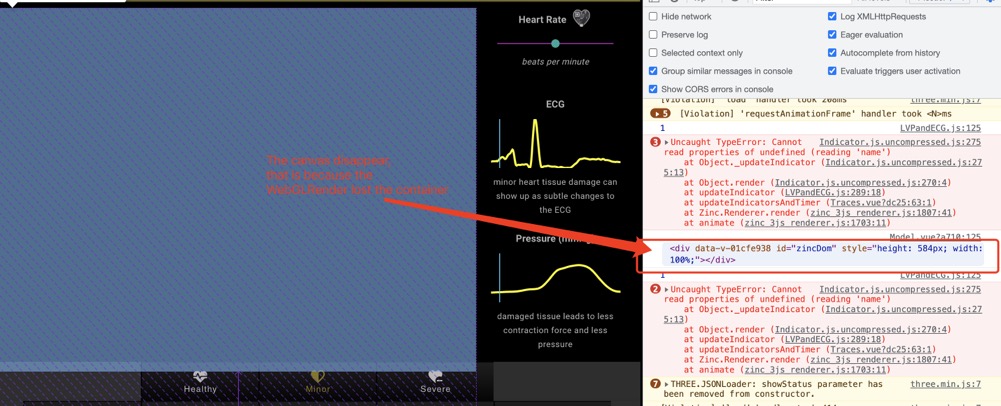
However, you maybe feel confused here, why we can switch the model successfully in before examples. That is because the WebGL render be initialed in the model page. That means everytime we switch the model, the page will be refreshed, and the WebGL render also will be recreated, so it will not lost the container. But, this has a very very very big issue, that is each refresh creates a new render, which consumes a huge amount of the computer’s GPU, and, with each model using its own render, it is impossible to share the data. More importantly, when you switch multiple times, the web app will be crashed,because of the huge memory consumption.
When the user switch the model multiple times (around 20 times, depends on his computer performance) the page crashed.
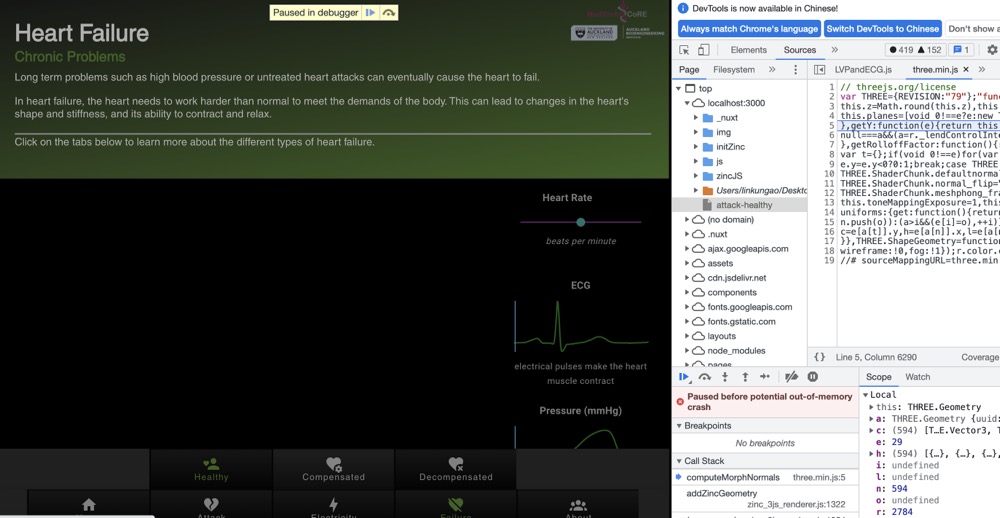
The key reason for these issues is the url data be designed send through the nuxt route, and there is no stable container for WebGL render, because every time we switch the topics the page will be refreshed and everything will be recreated.
Solution for Refresh Issue
During above issue’s description, we can identify the main issue is that every time we switch the model page, everything will be recreated. but the webGL render we only can have 8 in browser (maximum ). Ideally one webGL render is enough to support a 3D app. the more webGL render will cost a lot of GPU. Then that will lead page crashed. And when the model page be refreshed the container htmlelement will be destroyed. so the webGL render cannot find the htmlelement, even the nuxt create a same htmlelement with same id.
However, after multiple tests, I finally pinpointed the problem to the onWindowResize function in Zinc.js.
Firstly, we know the issue is the htmlelement will be recreated when the user switch the model.
Secondly, through multiple test, I noticed the ZincJS need the container attributes, such as clientHeight and clientWidth, to resize the window. But, when the nuxt recreated the htmlelement, the old container will be destroyed.Thus, the container in Zincjs will disappear, and the onWindowResize function will get the clientWidth=0 and clientHeight=0 to resize the canvas. That is the main reason cause the model cannot be shown in browser.
So, one solution is every time when the container htmlelement be recreated we can recreated a webGL render or replace the old container inside the Zincjs.
Obviously, recreated a webGL render is impossible, because the render contains the scene objects and animations, so we cannot recreate a webGLRender. Therefore, we can try the replace the container.
// So every time when the htmlelement be recreated, we can get the new element
//  when the htmlelement be recreated, all attributes will not be changed.

   this.container = document.getElementById("zincDom");
Then, we need to modify the Zincjs to allow us replace the container in the model component.
// In the zinc_3js_render.js file

   this.switchContainer = function (new_container) {
    container = new_container;
    container.appendChild(renderer.domElement);
  };

// Under model component
   this.container = document.getElementById("zincDom");

   this.zincRenderer.switchContainer(this.container);
Finally, We also need do the same thing for zinc.Scene.